
If you searched for "income statement statement," you probably mean an income statement: the financial statement that shows revenue, expenses, profit, and loss over a period.
That answer is quick. The audit work behind it is not. For auditors and finance teams, the income statement is not just a report to read. It is a workbook full of assertions that need support from invoices, payroll files, bank evidence, journal entries, schedules, and management explanations.
Auditing income statement lines in Excel? Blast Audit helps teams extract evidence from PDFs, match support to workbook cells, and keep reviewer-ready source links. Start with Matching for Excel reconciliations or Snip for source-linked evidence.
What Is an Income Statement?
An income statement reports a company's financial performance over a period. It shows revenue earned, expenses incurred, and the resulting profit or loss.
The SEC explains that income statements show how much revenue a company earned over a period and the costs and expenses associated with earning that revenue: SEC beginner's guide to financial statements.
The income statement is also called:
- Profit and loss statement.
- P&L statement.
- Statement of operations.
- Statement of earnings.
- Statement of profit or loss under IFRS wording.
If the query says "income statement statement," the doubled word is usually not a different report. It is a search variation. The useful answer is to define the income statement and then show how to test it.
For the broader beginner guide, read Income Statement: A Straightforward Guide. This page focuses on the audit workflow behind the statement.
Why the Income Statement Matters in Audit
The income statement carries some of the highest-risk areas in a financial statement audit. Revenue recognition, expense cutoff, payroll, accruals, classification, and unusual journals all affect profit.
For Blast Audit's audience, the key question is practical: can the reviewer trace each meaningful income statement line from Excel back to source evidence?
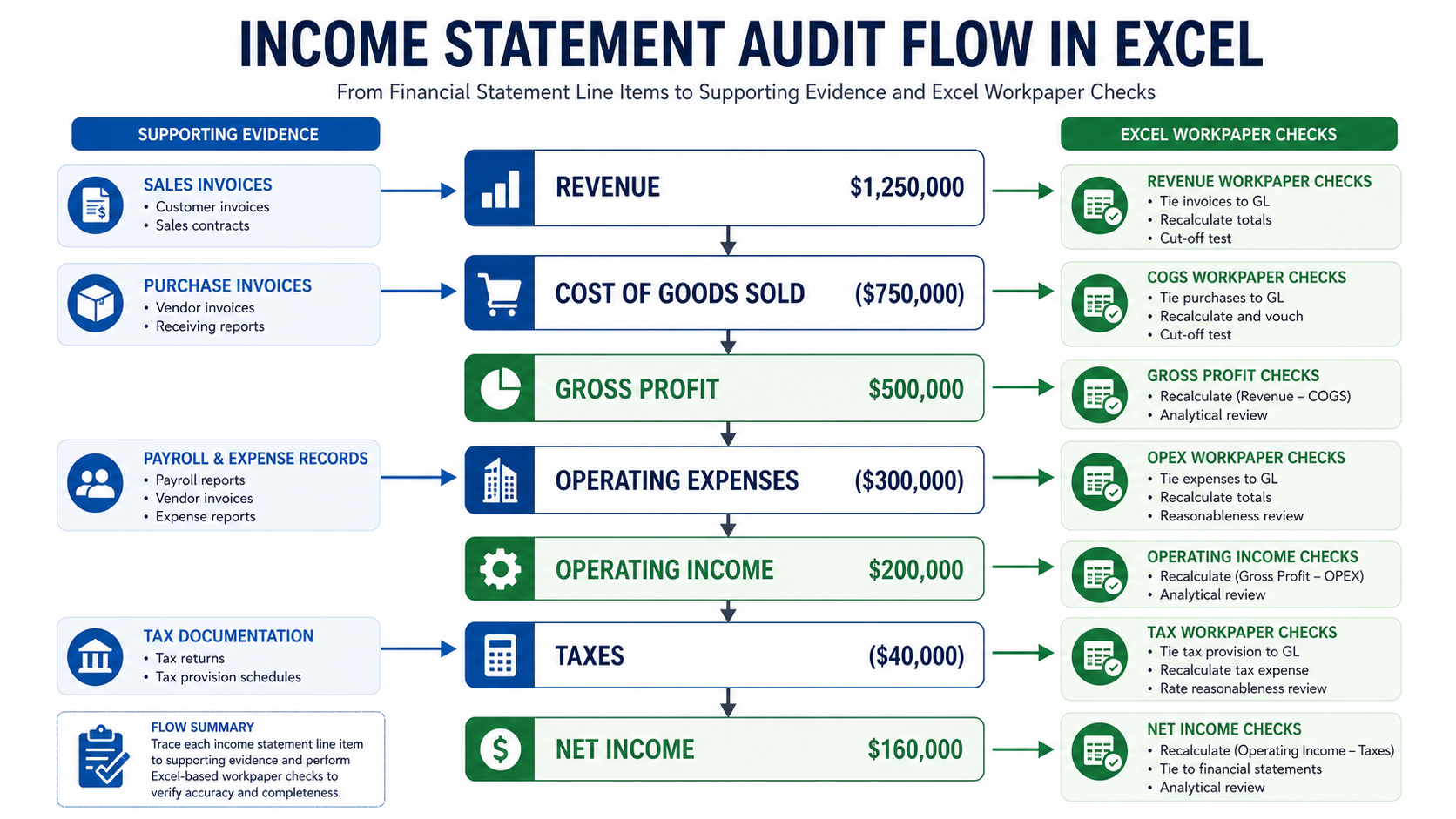
That means the audit team needs to connect:
- Revenue totals to invoices, contracts, and cash or receivables support.
- Cost of goods sold to inventory, supplier invoices, and production data.
- Payroll expense to payroll registers and HR data.
- Operating expenses to invoices, approvals, and payment support.
- Interest and tax lines to external statements or tax schedules.
- Journal entries to management support and approval evidence.
DataSnipper can compete on broad financial document automation. Blast Audit can own the Excel-specific task: tie the P&L line, supporting document, recalculation, exception, and reviewer note together in the workbook.
Income Statement Format
Most income statements follow a top-to-bottom structure:
| Section | What it shows | Audit question |
|---|---|---|
| Revenue | Sales or service income | Is revenue complete, accurate, and recognized in the right period? |
| Cost of goods sold | Direct costs tied to revenue | Do costs match the revenue period and source records? |
| Gross profit | Revenue less direct costs | Are margins consistent with evidence and expectations? |
| Operating expenses | SG&A, payroll, rent, software, marketing | Are expenses complete, classified correctly, and supported? |
| Operating income | Profit from core operations | Are unusual items excluded or explained? |
| Non-operating items | Interest, gains, losses, other income | Are items classified outside operations appropriately? |
| Taxes | Income tax expense | Does the tax line agree to tax workpapers? |
| Net income | Final profit or loss | Does the bottom line reconcile to equity and retained earnings? |
IFRS uses "statement of profit or loss and other comprehensive income" language in IAS 1. The IFRS Foundation's IAS 1 page is a useful reference for presentation of financial statements: IAS 1 Presentation of Financial Statements.
For audit work, the title matters less than the evidence. Whether the report is called income statement, P&L, or statement of operations, the reviewer still needs support for the lines.
Single-Step vs Multi-Step Income Statement
A single-step income statement groups revenues together and expenses together, then calculates net income in one step. It is common in smaller businesses and simpler reporting packages.
A multi-step income statement separates operating and non-operating items. It usually shows gross profit, operating income, income before tax, and net income.
Auditors should not treat the format as cosmetic. Format affects the questions the team asks:
- Does gross profit reconcile to revenue and direct costs?
- Are operating expenses separated from non-operating items?
- Are gains and losses clearly presented?
- Are unusual or one-time items visible?
- Does management's mapping from trial balance to P&L make sense?
In Excel, this often becomes a mapping problem. The trial balance may have hundreds of accounts, while the statement has a smaller set of report lines. The audit file should show how those accounts roll up.
Audit Risks by Income Statement Line
Revenue
Revenue is high risk because timing and completeness matter. Recognizing revenue too early can overstate profit. Missing revenue can understate performance or hide cutoff problems.
Auditors usually test revenue by agreeing samples to contracts, invoices, delivery evidence, cash receipts, and accounts receivable. They also review credit memos, manual journals, and period-end cutoffs.
Cost of Goods Sold
Cost of goods sold should match the revenue period and inventory flow. If COGS is understated, gross profit is overstated.
For manufacturers or retailers, auditors may compare COGS to inventory records, supplier invoices, production reports, and margin expectations.
Payroll
Payroll is often one of the largest expenses. The audit risk is not only amount; it is also completeness, classification, and authorization.
The team may compare payroll expense to payroll registers, headcount reports, bonus calculations, and bank payments.
Operating Expenses
Operating expenses include rent, software, travel, professional fees, marketing, insurance, and other recurring costs.
Common risks include unrecorded liabilities, prepaid items expensed too early, capital items expensed incorrectly, and costs classified in the wrong line.
Non-Operating Items
Interest, gains, losses, impairment, foreign exchange, and one-time items can distort operating performance if they are not presented clearly.
The audit team should inspect agreements, bank statements, asset sale documents, debt schedules, and management explanations.
Excel Audit Workflow for the Income Statement
Step 1: Lock the reporting period
The income statement covers a period, not a point in time. The audit team should confirm the start date, end date, reporting currency, entity scope, and consolidation scope.
Step 2: Map trial balance accounts to statement lines
Each income statement line should tie to accounts in the trial balance. The mapping should be stable, explainable, and reviewed.
This is where Excel becomes the center of the audit. A mapping tab can show account number, account name, financial statement line, preparer note, and reviewer signoff.
Step 3: Extract supporting evidence
Revenue lines may need invoices. Payroll may need payroll reports. Rent may need lease contracts. Professional fees may need invoices and approvals.
With OCR for Excel, scanned PDFs can become searchable. With Snip, auditors can place evidence into the workbook with a source link.
Step 4: Match evidence to workbook cells
The audit team should match support to the line being tested, not just store documents in a folder.
For example, if software expense is $240,000, the workbook should show which invoices, accruals, prepaids, or allocations support that number. Matching is built for this kind of document-to-cell reconciliation.
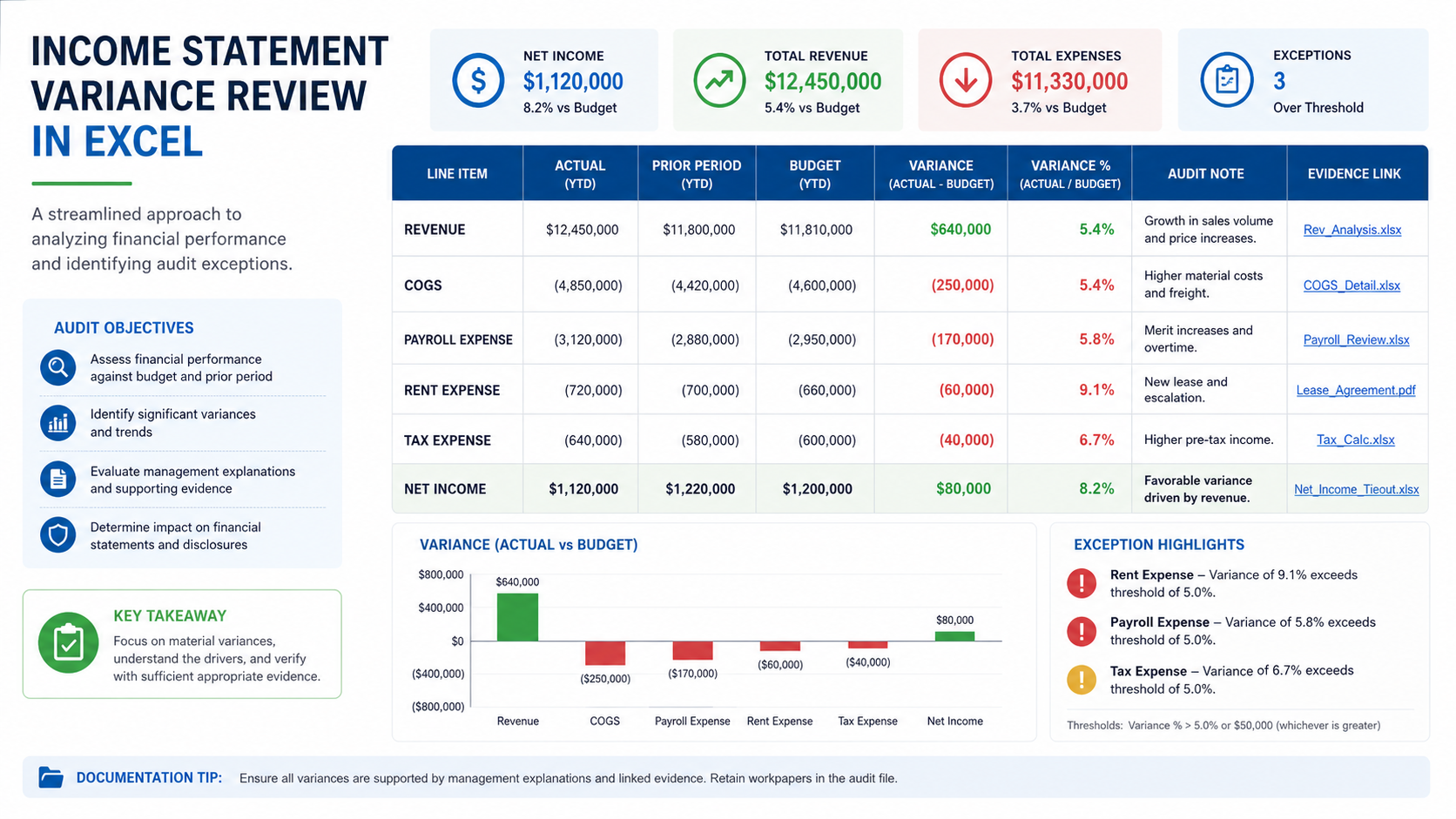
Step 5: Review variances and exceptions
Variance analysis should be tied to evidence. A 35% increase in payroll may be explained by headcount growth. A drop in gross margin may be explained by supplier cost increases. But the explanation should be supported.
What DataSnipper Covers vs What Blast Audit Can Own
DataSnipper is a strong competitor in financial document automation. Its site describes an audit and finance platform for collecting, extracting, cross-referencing, and verifying data: DataSnipper.
The competitor data from this brief shows the scale gap: datasnipper.com has roughly 50K organic visits per month, a domain authority of 60/100, about 601 top-3 pages, and 3,494 tracked keywords. Blast-audit.com has roughly 21 organic visits per month, domain authority 0/100, and no top-3 pages yet.
That means Blast Audit should not chase a generic accounting encyclopedia page. The opportunity is to turn the definition into a practical Excel audit workflow.
| Topic | Generic document automation angle | Blast Audit Excel audit angle | Why it matters |
|---|---|---|---|
| Definition | Explain the income statement | Explain the statement and the workbook tests | Searcher gets a practical audit path |
| Evidence | Extract data from documents | Link P&L cells to source evidence | Reviewers need traceability |
| Variance analysis | Summarize documents | Tie explanations to support | Audit notes need evidence |
| Mapping | Process financial data | Map trial balance accounts to statement lines | Misclassification affects profit |
| Comparison path | Broad finance automation | Excel-native audit add-in | Buyer lives in Excel |
For comparison content, read DataSnipper vs Blast Audit. For related financial statement concepts, read Revenue Statement Guide, Balance Sheet Guide, and Cash Flow Statement Guide.
Common Mistakes When Auditing an Income Statement
Mistake 1: Reviewing the statement without the mapping
The financial statement line may look reasonable, but the account roll-up may be wrong. Auditors should inspect the mapping from trial balance to statement line.
Mistake 2: Accepting variance explanations without support
"Revenue increased because sales improved" is not enough. The file should show invoices, customer data, contracts, or reconciliations that support the explanation.
Mistake 3: Ignoring cutoff
Revenue and expenses must land in the right period. Cutoff errors can move profit between periods.
Mistake 4: Treating documents as storage instead of evidence
A folder full of PDFs is not the same as a reviewed workpaper. The stronger file links the relevant page or amount to the exact Excel cell being tested.
FAQs About Income Statement Statement
What does "income statement statement" mean?
It usually refers to the income statement, also called the profit and loss statement or P&L. The repeated word is normally a search variation, not a separate report.
What does an income statement show?
It shows revenue, expenses, and profit or loss over a reporting period.
Is an income statement the same as a P&L?
Yes, in most business contexts. Income statement and profit and loss statement usually refer to the same report.
What is the most important income statement audit risk?
Revenue recognition is often one of the highest-risk areas, but auditors also review expense completeness, cutoff, classification, journals, and unusual items.
How do auditors test an income statement in Excel?
They map trial balance accounts to statement lines, extract support, match evidence to cells, test samples, analyze variances, and document exceptions.
How does Blast Audit help with income statement testing?
Blast Audit helps auditors keep evidence, OCR, matching, source links, and reviewer notes inside the Excel workflow.
Final Takeaway
"Income statement statement" is usually a redundant way of searching for the income statement. For auditors, the useful answer is not just the definition. It is the Excel workflow that proves revenue, expenses, margins, variances, and net income with traceable evidence.
Blast Audit can win that niche because it is built around Excel audit work. Review Blast Audit pricing or start with Matching for income statement evidence.